
We've put together these FAQs to help you navigate our retreat offerings and make the most of this opportunity to connect with our global community. For detailed guidance on quality standards, best practices, and retreat requirements, please refer to the Retreat Quality Standards and Guidelines.
About Insight Timer Retreats
Insight Timer offers retreat hosts a powerful platform to promote their in-person meditation, yoga, mindfulness, and wellness experiences to a highly engaged global audience of 30 million community members. Your retreat gets featured across key touchpoints on the platform—your Teacher Profile, the Teachers Tab, post-meditation screens, in-app notifications to your followers, and our dedicated Retreats website—giving you visibility to both your existing community and new students worldwide.
Retreat listing is free. When a participant books your retreat through our platform, Insight Timer collects a 10% non-refundable deposit to cover our booking, payment processing, and platform costs. You receive the remaining 90% of the payment directly from participants. We support co-hosting with other teachers, and our team is here to guide you every step of the way. It's a trusted, high-visibility channel to help you fill your retreat and reach the right audience.
Fees and payments
1. What are the fees and costs associated with publishing Retreats on Insight Timer?
Listing retreats on Insight Timer is free. There are no fees to create your listing or feature your retreat on the platform. When a participant books through our system, Insight Timer charges a non-refundable deposit that equals 10% of the total retreat cost. This deposit covers our booking infrastructure, secure payment processing, customer support, and marketing of the platform. You will collect the remaining 90% of the payment directly from the participant on the balance due date you specify during the listing setup.
2. Why are retreats required to have a minimum price of $200 for multi-day retreats and $100 for one-day retreats?
Because the retreat platform is brand-new, we're still building out our infrastructure and each listing carries fixed start-up costs for secure payment processing, customer support, marketing, and platform infrastructure. As the number of retreat bookings and listings grows over time, and those per-listing costs decrease with volume, we plan to lower or eventually remove the minimum price requirement entirely. This will give you more flexibility to offer a wider range of prices and price points for your retreats.
To meet the current minimum price requirement, we recommend considering ways to add extra value to your retreat package. You might include a 1:1 coaching call with participants, offer meals or retreat materials, extend the retreat by an extra day, bundle additional offerings like a post-retreat follow-up workshop, or add other features that enhance the experience. This way, participants feel they're getting genuine value for the investment, while you're building your retreat business on a trusted platform with access to millions of potential attendees.
3. When are balance payments due?
You have flexibility in setting your payment timeline. You can set a payment window of anywhere from 0 to 150 days before your retreat start date for participants to pay their remaining balance. For example, if you set the window to 120 days, here's how it works: cancellations that happen 120 or more days before the retreat start date will receive a full refund of the remaining balance they've paid. Cancellations that happen within 120 days of the start date are non-refundable, unless the cancellation is due to unforeseen circumstances (which you can choose to accommodate on a case-by-case basis). You also have the ability to add your own custom cancellation policies and payment plan options to give participants choices. For more information about these options and how to configure them, see the balance payment options article.
4. I need to collect a deposit from each participant to organize my retreat
We understand completely—deposits are often essential for planning a retreat and securing vendors, accommodations, and materials. The standard retreat listing form doesn't include a separate deposit option by default, but we can enable this feature for you manually upon request. Our team recognizes how important deposits are for retreat logistics and planning. If you need deposit functionality, email us at retreats@insighttimer.com and our team will add the deposit collection feature to your listing so you can require deposits from participants upfront.
Listing your retreat
5. How do I list a Retreat?
You can add your retreat by filling out the comprehensive form in your Teacher Dashboard. Here's how to get started:
- Log in to your Teacher Dashboard using your teacher credentials.
- Scroll down on the dashboard and click Retreats on the left navigation menu.
- Fill out the retreat listing form with all your retreat details and submit your listing for review by our team.
Co-hosting: If you're co-hosting the retreat with another Insight Timer teacher, you can add them in the 'Co-Host' section found in Step 3 (Info) of the listing form. When you add a co-host, the retreat will display on both co-host profiles on the app and on our website, which expands the reach of your retreat to both audiences. However, all participant bookings will be processed and managed through the teacher account that originally created the listing, so coordination between co-hosts is important. Adding a co-host is optional—you only need to do this if you're genuinely co-hosting the retreat.
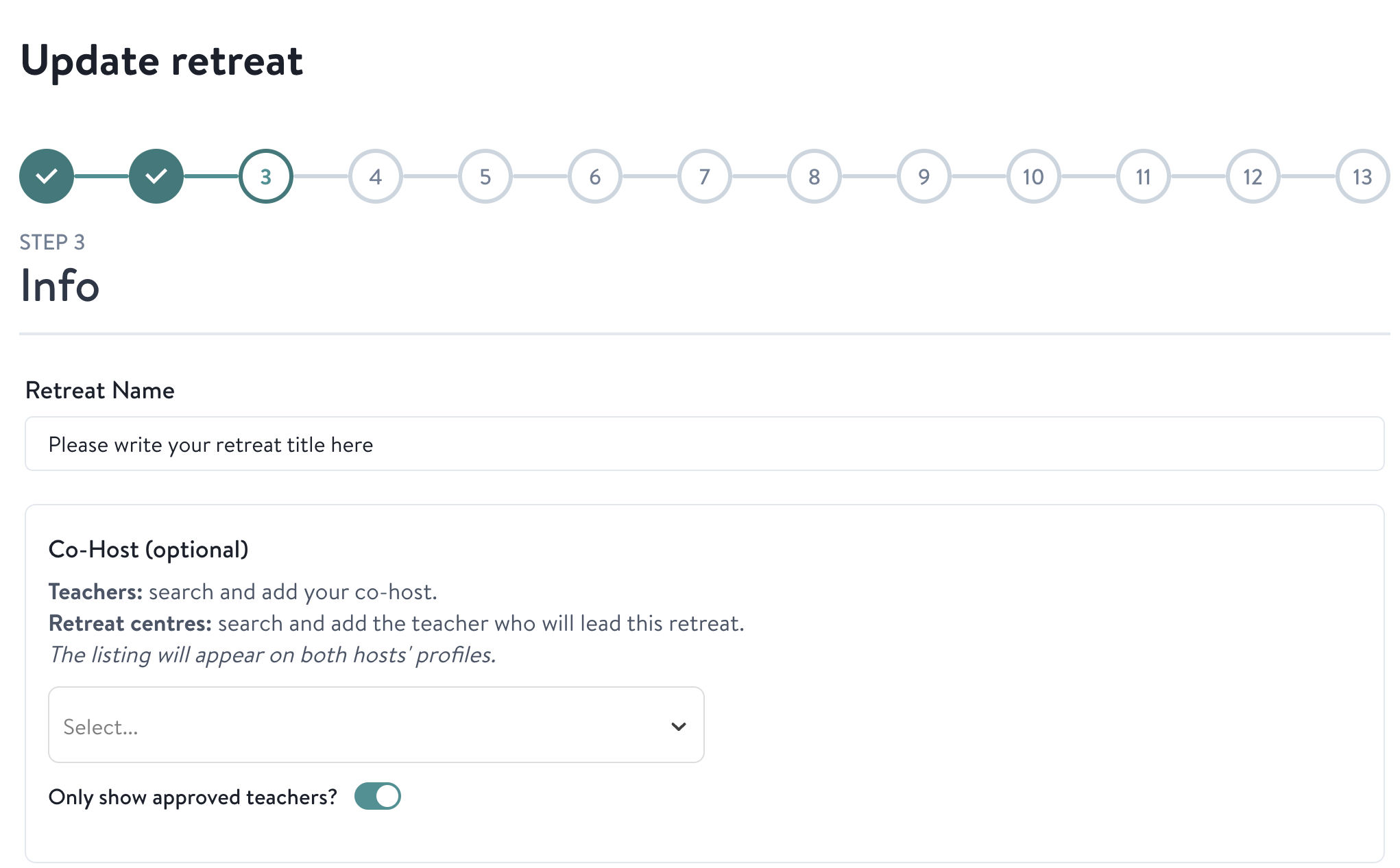
For a complete, step-by-step walkthrough of filling out every field in the retreat form, see our detailed step-by-step guide to listing a retreat on Insight Timer. This resource walks you through each step and explains what information to include.
6. Where do I add information that hasn't been specifically requested in the retreat upload form?
If you have additional details about your retreat that don't fit into the main form fields, you can add them to the FAQs section for your specific retreat. This section is found in Step 12 of the retreat upload form. The FAQ section is a perfect place to include retreat-specific details, answer common questions from potential participants, clarify your policies, explain what to bring or how to prepare, describe the daily schedule in more detail, or provide any other helpful information that participants might want to know before booking.
After someone books
7. What happens after someone makes a booking?
Once a participant completes their booking through the Insight Timer platform, our system will send you an email containing all of the participant's contact information and booking details. You should review this information and then contact them directly within 2 business days to complete their registration process and organize the payment of their remaining balance (the 90% that you'll collect directly from them). This is your opportunity to answer any final questions they have and confirm the details of their participation.
8. What happens if a participant wants to cancel?
If a participant wants to cancel their retreat booking, they will reach out to you directly to request a cancellation. Once you receive their cancellation request, you'll need to review it against the cancellation policy you've established for the retreat and decide how to proceed. You have discretion in handling these requests, but we ask that you do your best to accommodate requests from guests where it's reasonable to do so based on your policies and circumstances. The cancellation terms and refund amounts are based on the policies you've set during the listing creation process.
Marketing and visibility
9. How will Insight Timer promote my retreats?
Your retreat gets promoted across several key areas of the Insight Timer platform and app, giving it significant visibility to our community:
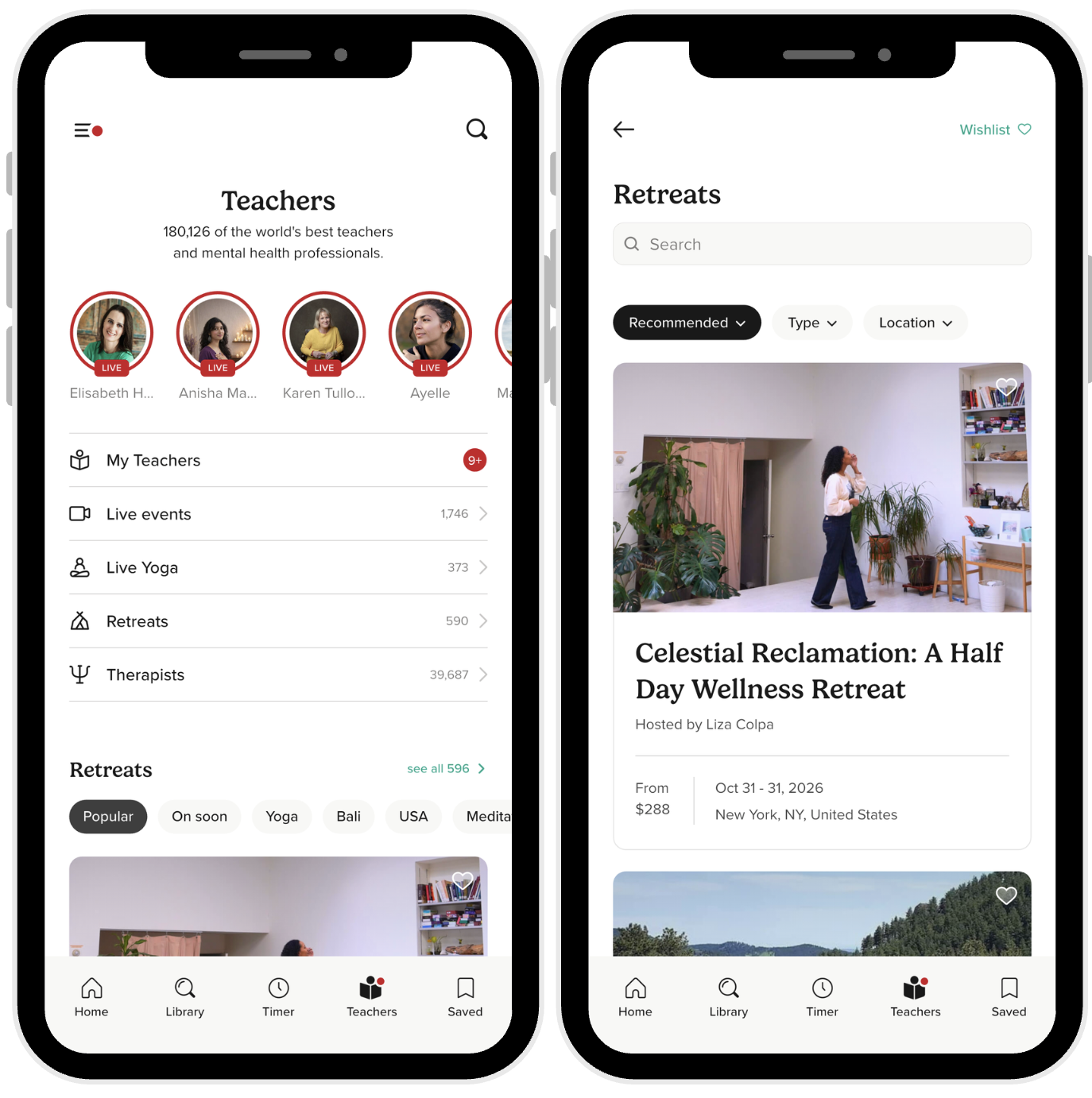
- Teachers Tab: Retreats are featured prominently in the Teachers tab on the Insight Timer app, where community members browse and discover teachers and experiences.
- In-App Notifications: When you publish your retreat, we automatically send an in-app notification to all your followers, letting them know you have an upcoming in-person experience they might be interested in.
- Post-Meditation Screens: After community members finish a meditation or attend one of your Live Events on the platform, your retreat information will be displayed on the post-meditation screen, reaching people who are already engaged with your content and likely to be interested.
- Retreats Website: Your retreat will appear on our dedicated Retreats Website, giving it visibility to a wider audience of community members who are actively exploring retreat options and looking for in-person experiences.
- Your Teacher Profile: Your retreat will be visible prominently on your teacher profile within the app, making it easy and convenient for your existing followers to discover and book your retreat.
10. How can I promote my retreat to the Insight Timer community?
While Insight Timer provides built-in promotion across the platform, you can significantly increase visibility by taking an active role in marketing your retreat to our community. Here are some effective strategies you can use:
- Host Live Events: Use the Live Events feature on Insight Timer to showcase your teaching style, expertise, and personality, build a more engaged audience who connects with you, and directly connect with potential retreat attendees. Live events are a great way to let people experience you in real-time and decide if your retreat is for them.
- Leverage your Content: Regularly produce and share high-quality, engaging, and relevant content that resonates deeply with your audience and reflects the themes and benefits of your retreat experience. When your regular practice content aligns with your retreat offering, it naturally encourages people to sign up for the in-person experience.
- Engage with the Community: Reply thoughtfully to reviews and comments on your content, interact authentically with community members, and build meaningful connections with your audience. Community members are more likely to attend a retreat from a teacher they feel a connection with and who engages with them.
- External Promotion: Share your retreat link through your own external channels and networks, including your personal email list, social media accounts (Instagram, Facebook, LinkedIn, etc.), newsletters, and website. Invite people in your personal network to join your retreat—they may already trust you and just need to know about the opportunity.
Making changes to your retreat
11. What is the process for editing retreats?
If you need to make any changes or edits to a retreat that you've already published, please contact us at retreats@insighttimer.com. Explain what changes you need to make and our team will review your request. We can either revert the listing back to draft mode so you can make the updates yourself directly in the form, or if you prefer, our team can make the edits on your behalf. Just let us know what needs to change and which option works better for you.
Inspiration: One teacher's retreat story
We'd love for you to watch David Gandelman's story about his experience promoting his retreat on Insight Timer. His journey is an inspiring example of how teachers like you are sharing transformative retreat experiences with our global community and creating meaningful in-person connections with the students they serve. His success might inspire ideas for your own retreat.
Questions?
If you have any additional questions or concerns about Insight Timer Retreats, how to list your retreat, promote it, or handle bookings, please reach out to us at retreats@insighttimer.com. We're here to help you succeed and to support you throughout the retreat process.