
Here's what you need to know about Insight Timer's new payment system, powered by Tipalti. Whether you're getting started or have questions along the way, we've broken everything down into clear, actionable steps.
Understanding Tipalti and Why We Made This Change
Who is Tipalti?
Tipalti is a global leader in payment automation. They're trusted by companies worldwide to manage and process payments reliably and efficiently—that's why we chose them to handle teacher payments for our platform.
Why we enhanced our payment platform
We upgraded to Tipalti to give you more choices in how you receive your income. You'll have access to multiple payment methods, better foreign exchange rates, and a smoother experience overall. As we've grown to serve 30 million community members worldwide on our platform, we needed a payment system that could scale with us and support teachers across every region.
What's better with the new platform?
- Choose from multiple payment methods that work for your situation
- Access competitive foreign exchange rates—typically 1.5%-3%, which is lower than PayPal's usual 3%-4%
When the transition happened
Since May 21st, all teacher payments have been processed through Tipalti. If you haven't updated your payment details yet, we recommend doing it as soon as possible. You'll need to complete this setup to keep receiving your payouts on schedule.
Getting Started: Your Setup Checklist
What you need to do
The entire process takes about 5 minutes. Head to your Payment Settings tab in the Teacher Dashboard and work through these steps:
Step 1: Verify your address
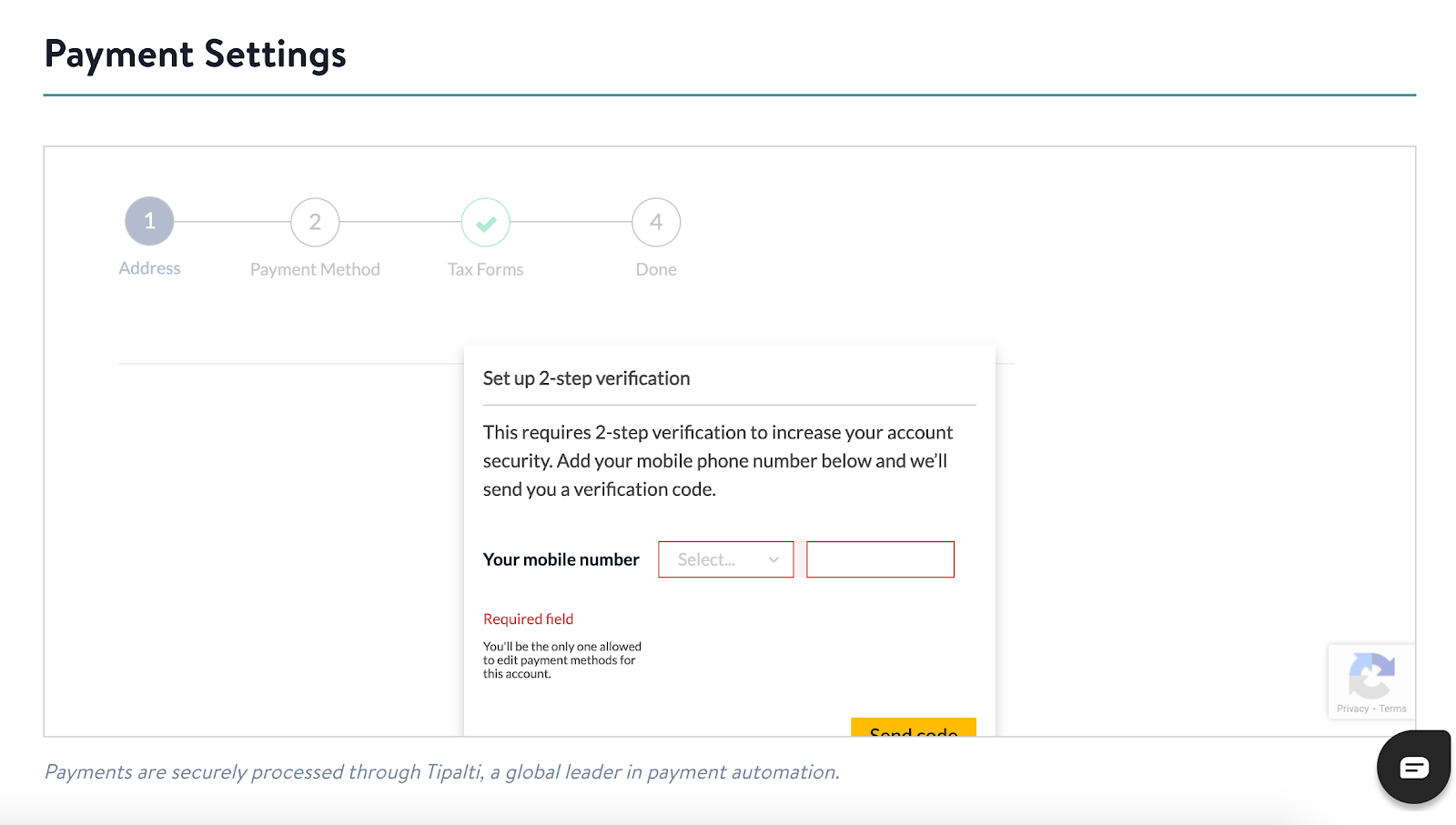
We'll start with two-step verification to keep your account secure.
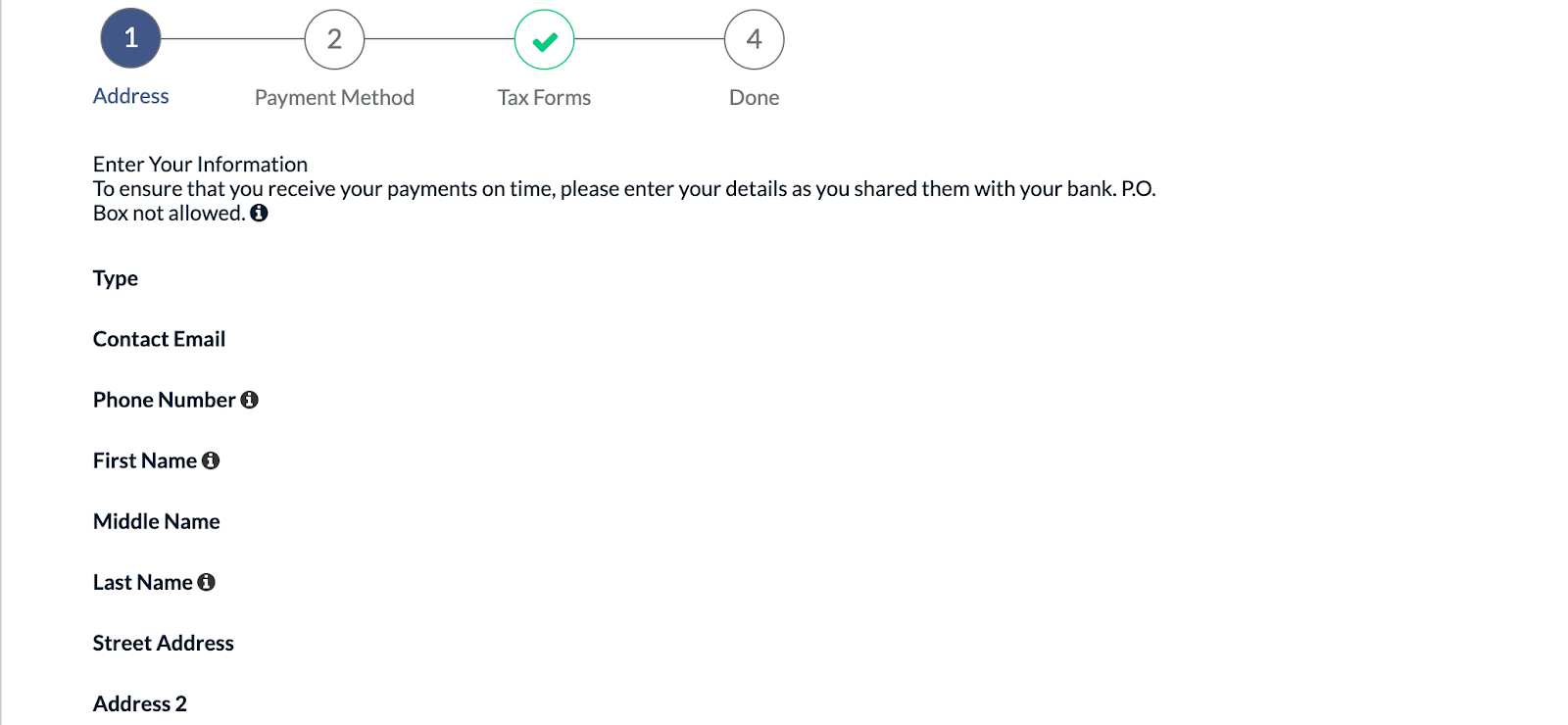
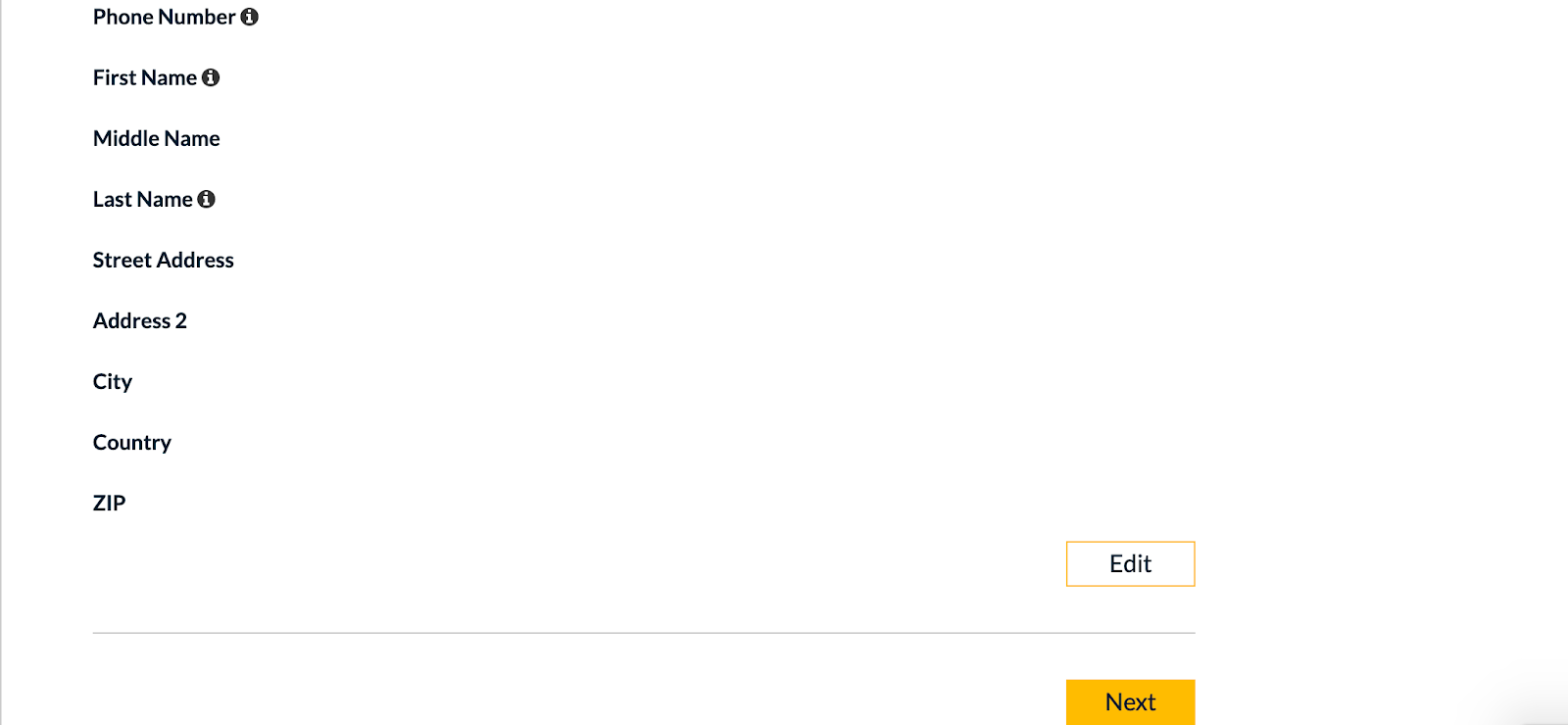
Next, enter your contact details. This is important: your first and last name must match exactly what appears on your bank account or chosen payment method. Any discrepancies here can cause payment delays, so take a moment to get it right.
Step 2: Choose your payment method
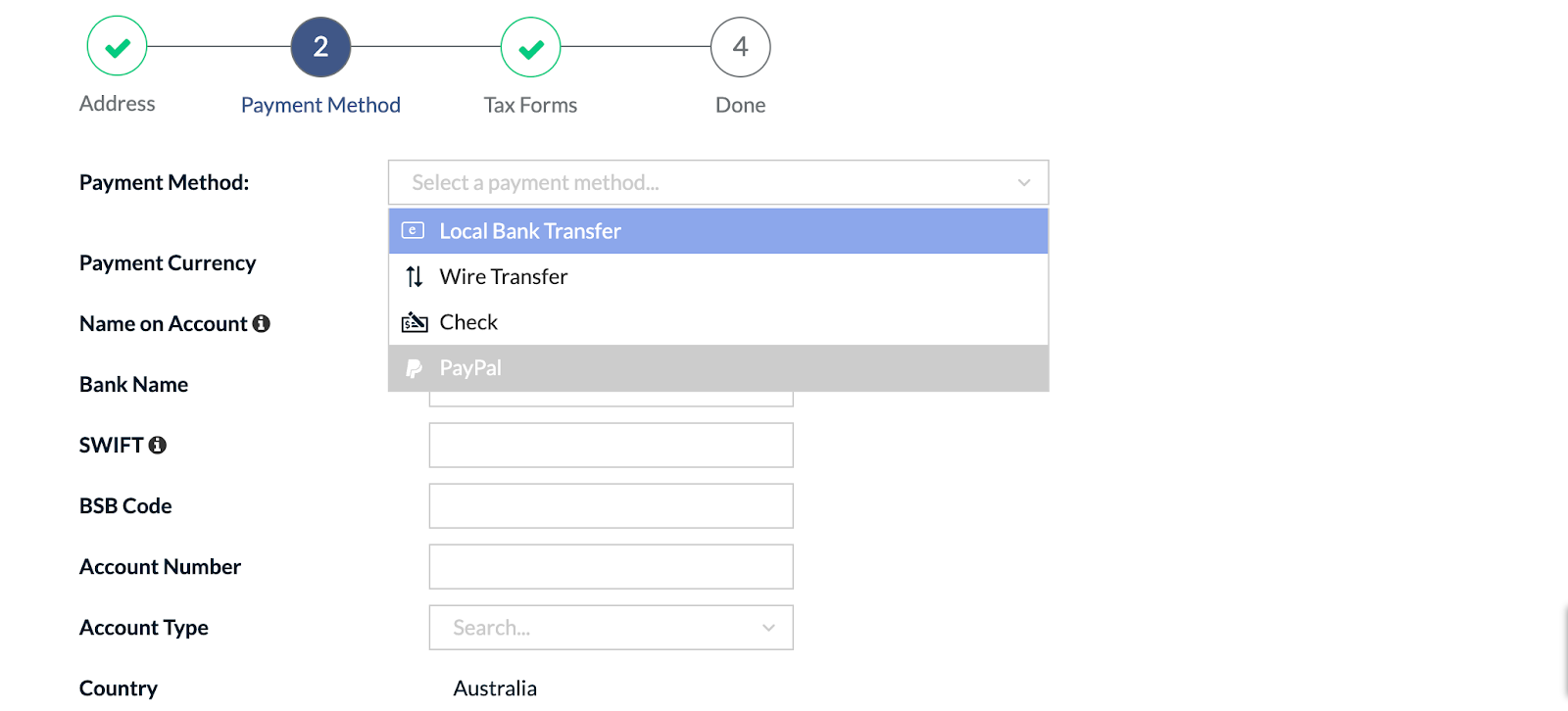
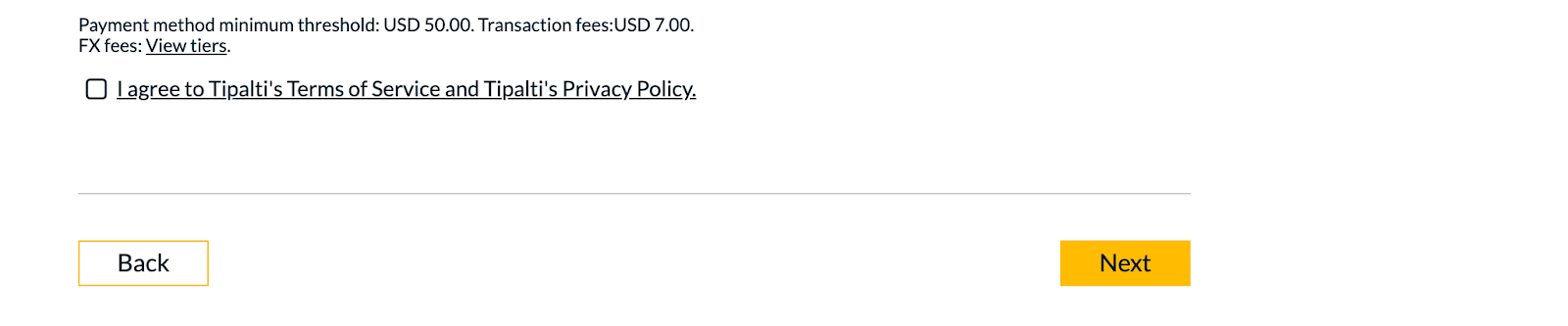
Select the payment method that works best for you and enter the required details.
- Local Bank Transfer (ACH/eCheck)
- Wire Transfer
- Paper Check
- PayPal
Step 3: Complete your tax information
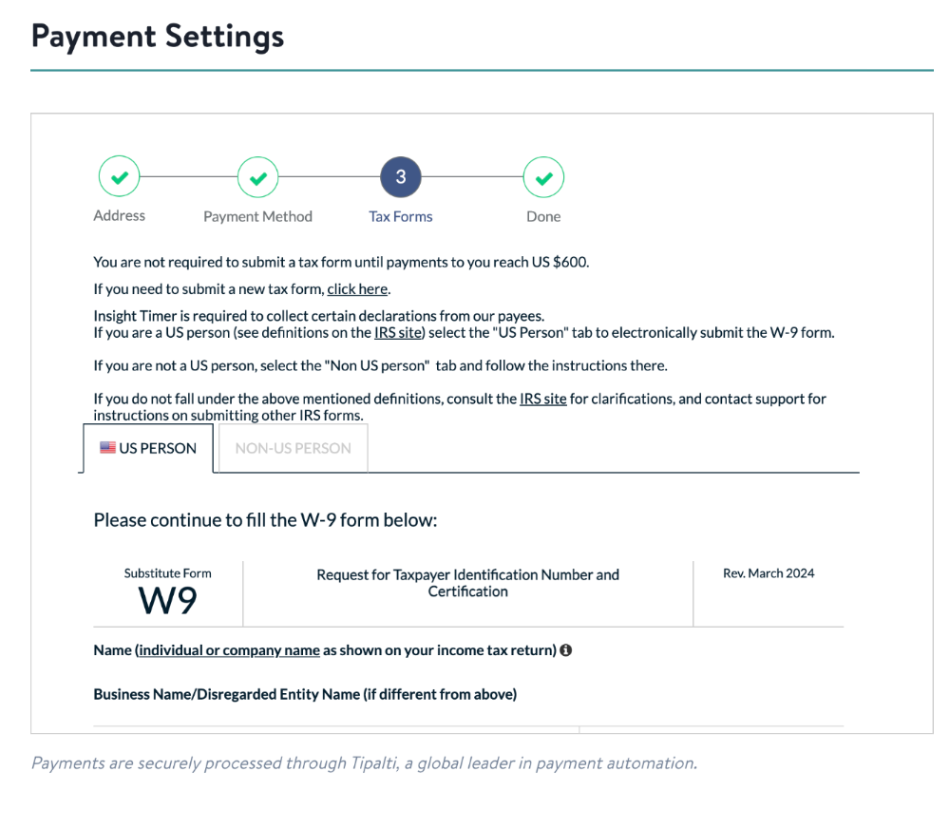
You'll only need to submit tax forms once your earnings reach $600 in a calendar year. That said, we recommend completing this step now to stay ahead—once you cross the $600 threshold, you won't be able to receive payments until your tax form is on file.
Indicate whether you're a "US Person" or "Non-US Person." This helps us ensure everything is compliant with tax regulations.
Step 4: You're all set!
Payment Methods, Fees, and Minimums
Each payment method has its own minimum payout threshold and transaction fees. We've put everything into a table below so you can compare and make the best choice for your situation.
Need help choosing? We've got guidance below.
Who pays the transaction fees?
Transaction fees are deducted from your earnings before payout. Tipalti sets these fees, and they vary depending on which payment method you choose.
What are the transaction fees?
Fees vary by payment method, so it's worth checking the table below. Here's a pro tip: double-check your payment information before submitting. If a transaction fails because your details were wrong, you'll be charged a rejection fee on top of it.
If your earnings don't reach the minimum threshold for your payment method in a given month, don't worry—your funds will automatically roll over until you hit that amount or update your payment method.
Payment Method | Details | Fees (Per transaction, USD) | Threshold (USD) |
| Paypal (US) | Paypal to a US account | $1 Tipalti Fee + 2% (Up to $2 in total) | $10 |
| Papal (Non-US) | Paypal to a non-US account | $1 Tipalti Fee + 2% (Up to $2 in total) | $10 |
| ACH (US) | Local bank transfer in the US in USD | $1 | $10 |
| Global ACH/eCheck | Local bank transfer/Global international ACH, also known as eCheck | $7 | $50 |
| Paper check | Check price includes printing, mailing, and check clearing | $1.99 | $10 |
| Wired USD domestic | Wire transfer USD to USD, U.S. Payee Account | $15 | $50 ($100 from July 21, 2025) |
| Wire - International USD to Local Currency | Non-USD wire transfer | $20 | $50 ($100 from July 21, 2025) |
| Wire - International USD to USD | Wire transfer USD to USD, international Payee account (where local currency is not available) | $26 | $50 ($100 from July 21, 2025) |
Foreign exchange rates
When you receive payments in a currency different from USD, Tipalti charges a foreign exchange fee. These typically range from 1.5%-3% depending on your country, payment amount, and current exchange rates. This is generally lower than PayPal's typical currency conversion rates of 3%-4%.
Which payment method should I choose?
Here's our guidance to help you pick the right one for your situation:
- For domestic payments within the US: ACH (Automated Clearing House) is your best bet. It's straightforward, cost-effective, and typically takes 3-5 business days.
- For international payments under $300: PayPal usually works out better, since the 2% fee tends to stay below the $7 eCheck flat fee.
- For international payments over $300: eCheck makes more sense. With a flat $7 fee, it's cheaper than PayPal's 2% once you're sending larger amounts. For example, a $301 payment via PayPal would cost $7.02 in fees, and that percentage keeps climbing with bigger amounts (capped at $21 total).
Keep in mind that both PayPal and eCheck may apply foreign exchange fees if you choose to receive payment in a currency different from your bank account's currency.
Important note: Your income statement shows the full amount we paid you. Your actual net payout will be lower because it includes external fees—like transaction fees, rejection fees, and currency conversion charges—applied by third-party payment processors.
I'm happy with PayPal. Do I still need to update my details?
Yes. Even if you plan to stick with PayPal, you must update your payment details in the new payment portal. This ensures you'll receive payments starting with your April 2025 earnings (paid out in May 2025).
What if PayPal isn't available in my region?
If PayPal isn't available where you are, you'll see other payment options displayed in the system automatically. Choose whichever method works best for your location.
Why are some countries or regions not supported for payments?
Unfortunately, due to regulations enforced by the Office of Foreign Assets Control (OFAC), we're unable to process payments to certain countries and regions.
Tax Forms
When do you need to submit tax forms?
US teachers: You'll need to submit a digital W-9 form through the secure Tipalti portal on your Teacher Dashboard. If you're expecting to earn $600 USD or more this year, we recommend submitting by April 30 to avoid any payment interruptions.
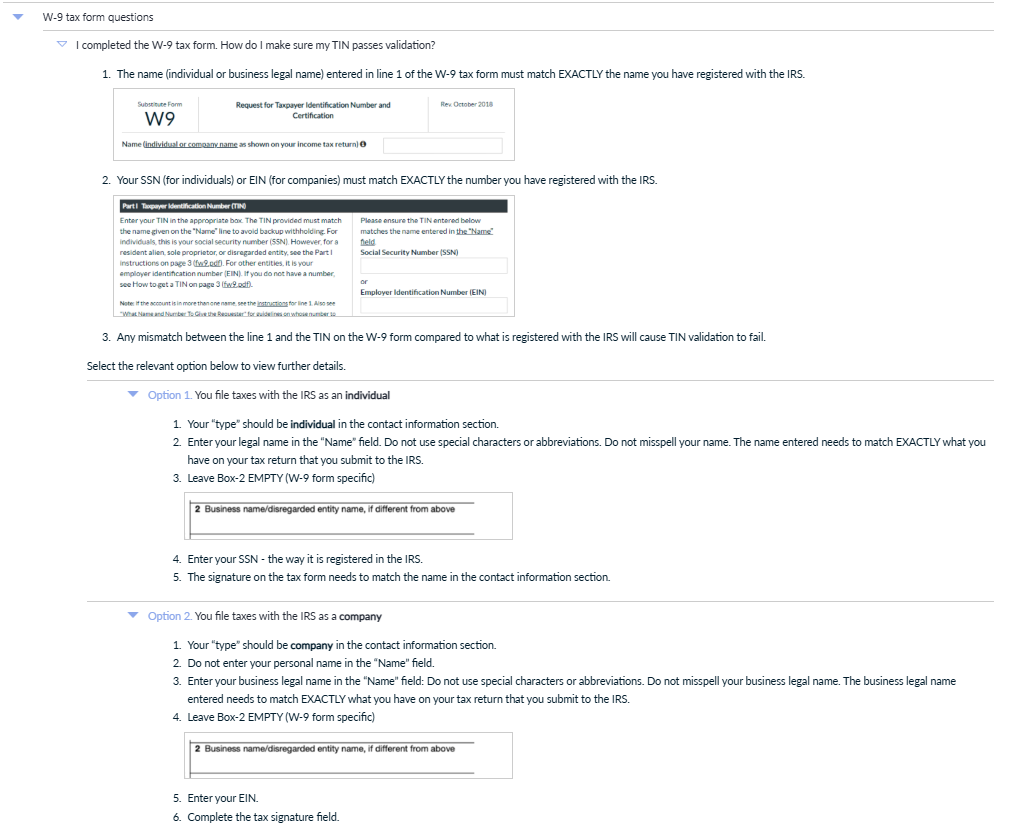
For specific questions about W-9 forms, check out the Tipalti FAQ—look under the Taxation section for "W-9 tax form questions."
Non-US teachers: Submit a Non-US Declaration form through Tipalti before your total earnings reach $600 USD in the calendar year.
What if you don't submit a tax form?
If your earnings cross the $600 USD threshold and you haven't submitted your tax form, we'll hold that payment (and any subsequent ones) until the form is completed. Let's look at an example: you've earned $550 USD so far, and your next payout is $60 USD. That $60 payment gets held until your tax form is on file.
Where is your tax information stored?
Tipalti collects and securely stores your tax information—not Insight Timer. This adds an extra layer of security for your data.
Why are tax forms required?
The IRS requires tax forms when earnings reach $600 USD or more in a calendar year. It's a standard requirement we have to follow to keep everything compliant.
Troubleshooting and Common Errors
What happens if your bank details are wrong and the payment gets rejected?
Tipalti will charge you a rejection fee. Here's what you might see depending on your payment method:
- US ACH - $11
- Global ACH / International ACH / eCheck - $25
- Wire transfers - $25
Your bank might add another fee on top of that. To avoid this, always verify your banking information before submitting—triple-check account numbers, routing numbers, and your name.
What if you don't update your payment details?
If you don't update your information, we won't be able to process your payments, and you could face additional fees.
Important: Payment processors charge fees for failed transactions due to incorrect banking information. Make sure your banking details are accurate and that the name you entered in Tipalti matches your bank account name and tax form exactly. Your bank may also charge additional fees on their end.
What's the equivalent of an IBAN transfer on Tipalti?
For international bank transfers, Tipalti uses IBAN, SWIFT, or BIC codes. If you have a US bank account, you'll need an ABA code (also called a routing number).
Will withholding tax be applied if you fill out the Non-US Declaration?
No, withholding tax won't be collected. That said, we recommend speaking with a tax professional to understand your specific tax obligations in your country.
Special Scenarios and Advanced Questions
I'm a Canadian teacher with a US dollar bank account at a Canadian bank
Many Canadian banks offer USD accounts, but they don't always support US ACH routing numbers. Check with your bank first to confirm they accept ACH payments and can provide a valid US routing number and SWIFT details. Not every bank supports this, and Tipalti might reject an entry if the bank isn't recognized as a US institution.
How do you receive 2FA codes when traveling internationally or without a phone?
Two-factor authentication codes can't be sent while you're roaming internationally. We suggest registering with a local phone number in your destination country to ensure you get the code. To reset 2FA on a different number, reach out to finance@insighttimer.com.
One alternative: Try Google Voice to receive 2FA codes.
If you're still running into problems, contact finance@insighttimer.com and we'll help you sort it out.
Your EIN keeps getting rejected when you submit the form
Usually, an EIN rejection means there's a name mismatch between what you entered and what's in the IRS database. Double-check your exact legal business name as it appears on your IRS records.
Still stuck? You can share your W-9 directly with finance@insighttimer.com, but often the quickest fix is to triple-check your spelling and make sure your name-EIN combination matches what's on record.
Should the name on your bank account match your tax form?
Ideally, yes. Your bank account name should match your Tipalti account name, which should match your tax form name.
If they don't line up, Tipalti's compliance team needs to approve the arrangement. You'll want to provide supporting documentation (bank statements, business certificates, etc.) that proves ownership or shows that the names refer to the same entity. Send that to finance@insighttimer.com and we'll review it.
You use a business bank account with a different name than your personal name
Set your Tipalti account type to "Company" and enter your business name exactly as it appears on your bank account. Grab your bank statement and verify the name matches perfectly.
If your documents are in your personal name but the business name is on the bank account, switching your account type to "Company" with the business name is the way to go. For your tax forms, make sure the legal entity name matches what your country's tax authority has on record.
Your W-9 is stuck and the system won't accept your information
Tipalti's forms are picky about exact matches with IRS data. Even small differences—a misspelled name, an extra space, a punctuation mark—can trigger a rejection. This is actually a good thing for security, but it can be frustrating when you're trying to move forward.
- Check your IRS documentation for the exact legal name and EIN
- Clear your browser cache and reload the form
- If it's still stuck, take a video or screenshot of your entries and the error message, and send it to finance@insighttimer.com
Your TIN or EIN validation keeps failing
Even when you're sure you entered it correctly, this can happen. Confirm that your EIN or TIN is correct and that your business name matches exactly what the IRS has on file. Reach out to finance@insighttimer.com if the problem persists.
You're a digital nomad without a permanent address
Tipalti requires an address that matches your bank's country. If you're moving frequently and updating your address regularly, this could trigger repeated verification requests or cause mismatches between your records—potentially delaying payments or putting a temporary hold on your account.
If maintaining a consistent address isn't practical for you, PayPal might be a better option. It's more flexible with digital nomads and handles cross-border transactions with fewer location requirements.
Will you receive funds during US bank holidays or weekends?
No. When US banks are closed for a holiday, transactions process on the next business day. The same goes for your local bank—if it's closed due to a local holiday, you'll receive your funds once it reopens.
Your name or address has special characters (e.g., å, ä, ö)
Tipalti doesn't currently support special characters in all fields. As a workaround, replace them with their closest ASCII equivalents. For example, "å" becomes "a" and "ö" becomes "o." The change won't affect how your bank processes the transaction, but be aware that it won't reflect your name or address exactly as spelled.
You're having trouble entering your name for PayPal on Tipalti
The name in Tipalti has to match your PayPal account holder's name exactly—including capitalization, spacing, and special characters. If rejections keep happening, take a screenshot or screen recording of the error and send it to finance@insighttimer.com along with any supporting documentation. We'll investigate and help you sort it out.
Can you receive payouts to an account in a different country than your registered address?
Yes, but Tipalti's compliance team needs to approve it first. Check out our Getting Paid to a Bank Account in a Different Country article for more details on how to make this work.
What's the payment timeline for each method?
We typically process payments on the 21st of each month. Here's what to expect for each payment method:
- ACH: Usually 3 to 5 business days
- Global ACH/eCheck: Usually 3 to 5 business days
- Wire transfers: Usually 1 to 5 business days
- Paper Checks: Can take up to 14 business days depending on local courier services in your country
- PayPal: Usually 1 to 2 business days
Need Help?
If you have questions or run into issues, we're here for you. Reach out to finance@insighttimer.com and our team will help you get it sorted.