
Insight Timer is expanding into video to help teachers deepen their teachings and give our community a more immersive way to learn.
Video on Insight Timer should feel calm, intentional and authentic. Simple, well-prepared videos that reflect presence, clarity and genuine connection often create the most powerful experiences — there's no need for fast-paced or highly produced content.
These guidelines will help you create videos that keep Insight Timer the trusted, peaceful space our community knows.
At a glance
- 720p minimum (1080p recommended), 16:9 or 9:16, at least 1 minute, up to 10GB
- Clear introduction, focused content, clean closing
- No on-screen text, logos, subtitles or graphics (limited educational exception)
- Publish at least 5 free videos before uploading premium content
- Your real voice and presence throughout — no AI-generated narration or visuals
1. Supported content types
All video content should be intentional, structured and wellness-oriented.
✓ Allowed
| ✕ Not allowed
|
2. Video publishing formats
| Format | Who can watch | What to know |
|---|---|---|
| Free videos | All Insight Timer users, at no cost | Must meet all video standards and work as complete, standalone content |
| Premium videos | MemberPlus subscribers only | Must meet all video standards and work as complete, standalone content. You need at least 5 published free videos first. |
| Video series / courses | Behind a paywall | Structured, multi-lesson programs — organised, intentional and progressive across lessons |
Audio or video? Choose one
Please don't re-upload content that's already published on Insight Timer as audio in video format (for example, adding visuals or background footage to an existing audio track). Choose the format that best supports the experience you want to create, and publish a single, intentional version.
Performance-style video (music, storytelling, meditative readings)
Publish these as video only when the visuals meaningfully enhance the experience.
- Music performances are a strong fit for video
- Real-world, well-produced visuals or b-roll are welcome (e.g. oceans, forests, landscapes)
- No artificial or animated visuals — including AI-generated visuals, animated loops or stock motion graphics
- AI may enhance real footage, but must not generate visuals
3. Structure, tone & delivery
Videos should be intentionally produced, well structured and easy to follow from start to finish.
1 · Open What the video covers, who it's for, what to expect, and any considerations (sensitive topics, physical limitations) | 2 · Teach Focused, well-paced content | 3 · Close A clear ending, a word of gratitude, and an invitation to return for the next practice |
- Flow & pacing: start and end cleanly (no long pauses or setup footage), keep a steady, intentional pace, and avoid rambling
- Preparation: prepare an outline in advance so the content feels structured, not improvised
- Delivery: speak naturally, address your audience directly ("you"), and keep a calm, supportive tone
- Clarity & inclusivity: give clear, easy-to-follow instructions and avoid assumptions about the viewer's experience or background
4. Video quality
Videos should look intentional, polished and curated — easy to watch on a phone and free from visual distractions.
Technical requirements
| Resolution | 720p minimum (1080p recommended) |
| Aspect ratio | 16:9 (horizontal) or 9:16 (vertical) |
| Duration | At least 1 minute |
| File size | Up to 10GB |
| Footage | Sharp and in focus, stable camera (no shaking), subject clearly framed and visible |
Lighting
| Framing
|
Environment & visual style
| Personal presentation
|
5. Audio quality
Audio must be clear, consistent and easy to understand.
Requirements
| Best practices
| Avoid
|
Great examples of video and audio quality
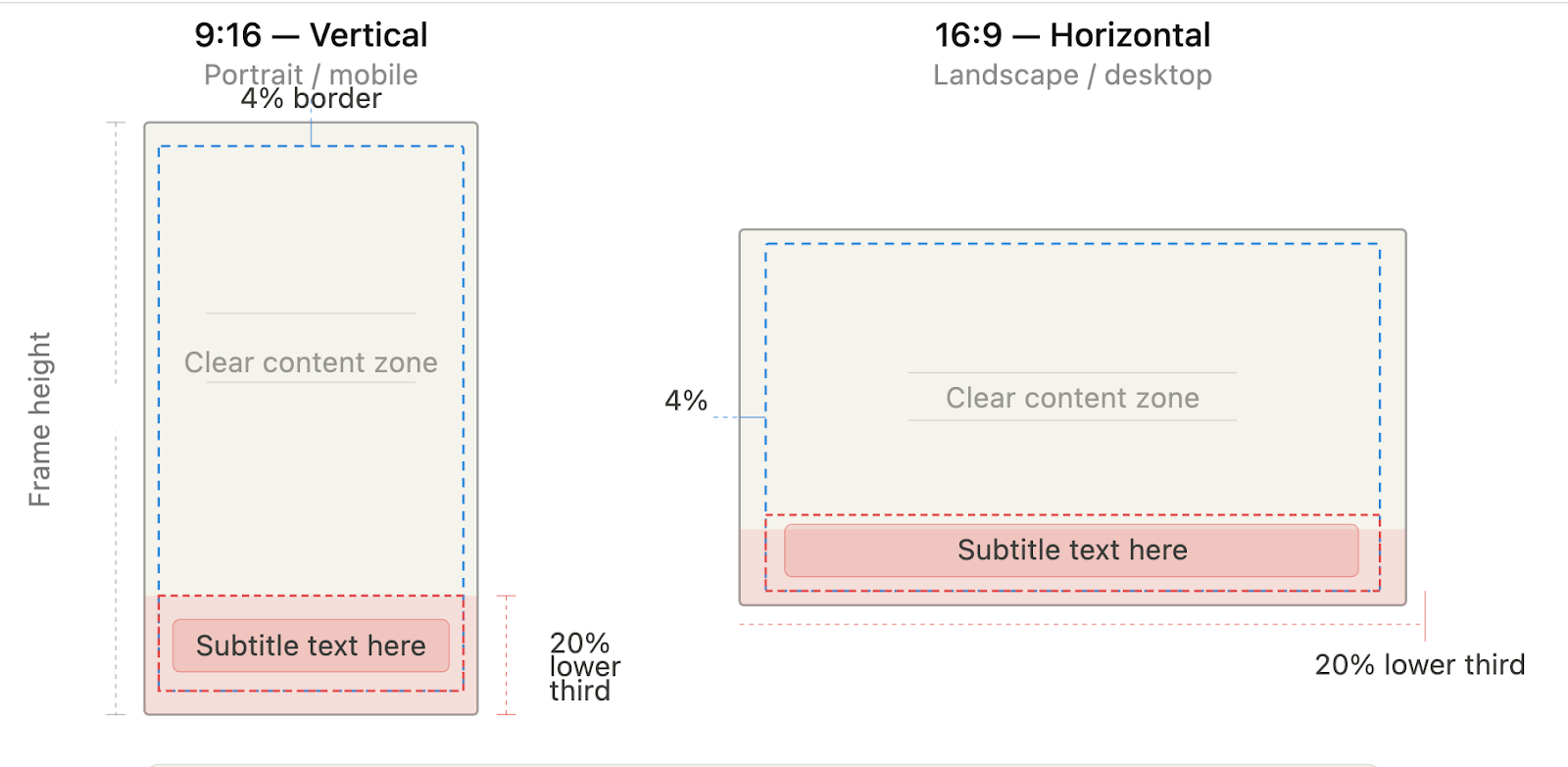
6. On-screen graphics (GFX)
To keep video across Insight Timer cohesive, calm and polished, please don't add on-screen graphics or text over your footage.
Educational exception
Minimal text may be used only when it clearly supports instruction in educational content. If it doesn't improve understanding, leave it out.
If you use GFX
| ✕ Never include
|
Safe zones for on-screen graphics
7. Title & description
Titles and descriptions must be clear, accurate and match the content.
| Do | Avoid | |
|---|---|---|
| Title | Use Title Case (e.g. "Morning Meditation for Stress Relief"). Keep it simple, descriptive and true to the video. | Promotional or exaggerated language; emojis or special characters |
| Description | At least 200 characters. Explain what the video includes, what to expect, and helpful context (focus, intention, who it's for). | External links; promotional language; emojis or decorative elements |
8. Thumbnail images
Your thumbnail is the first impression of your video — it should accurately reflect the content and experience.
- Requirements: high resolution (no blur or pixelation), no text, logos or overlays, and owned by you or royalty-free
- Best: a high-quality photo taken during your recording session
- Also fine: a clean screenshot taken directly from the video
- If you're the main subject of the video, you should appear in the thumbnail
- Stock images: discouraged — use only in rare cases, and only if they closely match the video's content and tone
- Unique thumbnails: give each video its own. Reuse is acceptable only for a clearly defined series with a consistent structure and intent
9. Content restrictions
Not allowed under any circumstances
|
|
10. Safety, credentials & rights
All content must be safe, responsible and compliant. You're responsible for making sure your content is appropriate, properly qualified and legally owned.
Sensitive topics
- Use calm, respectful, non-graphic language
- Don't sensationalise or dwell on harmful experiences — focus on support, healing and wellbeing
- Include a verbal trigger warning at the start of the video and in the description (where applicable)
- Clearly state that the content is not a substitute for professional care or treatment
Claims & safety notices
- Don't make medical, psychological or scientific claims
- Don't present content as a replacement for professional support
- If content may cause drowsiness or deep relaxation, remind viewers not to drive or operate heavy machinery
Credentials
Accreditation is required for specialised practices, including but not limited to MBSR, ACT, psychology, neuroscience, Wim Hof Method, yoga lineages and breathwork. Upload your credentials to Teacher Profile → Accreditations.
Copyright & ownership
You must own, or have permission to use, everything in your video — footage, audio recordings, music and images. Violations will result in removal of content.
11. AI usage
AI may support production, but must never replace you.
✓ Allowed Editing support — cutting, colour correction, noise reduction | ✕ Not allowed
|
Your real, recorded voice and presence must be present throughout the video.
Final check before you upload
☐ Visually sharp, well lit and distraction-free
☐ Clear and easy to hear
☐ Thoughtfully structured from beginning to end
☐ Free from on-screen text or graphics
☐ Aligned with Insight Timer's calm, supportive experience
We reserve the right to reject any content that doesn't meet our video standards.
Questions? Reach out to us at publishers@insighttimer.com.