
Groups for Teachers: Connect and Engage Your Community
If you teach on Insight Timer, creating your own group is a great way to engage with your community members. Groups give you a dedicated space to stay connected with the people who practice with you, build deeper relationships, and foster genuine loyalty around your work as a teacher. Your group becomes an extension of your teaching practice and a gathering place for your students who want to deepen their connection with you and with one another.
Why use Groups?
Within your group, you, your moderators, and your community members can post updates, chat with one another, recommend practices and content, and meditate together in a single dedicated space. It's where your students can ask questions about your teachings, share their personal experiences, connect with fellow practitioners, and feel part of something meaningful and bigger than themselves. This sense of community deepens commitment and transforms your individual teaching into a shared journey of transformation and growth.
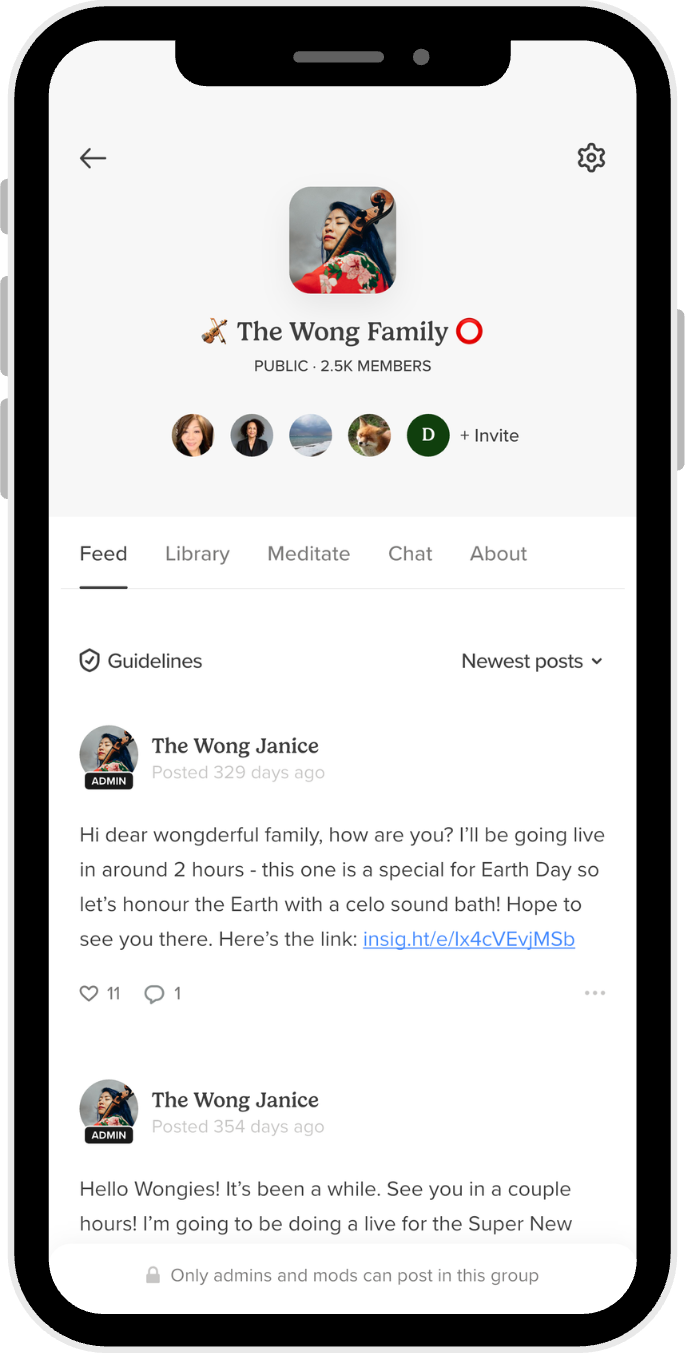
For teachers on our platform, groups serve several functions. They're ideal spaces for promoting new content releases and courses you've developed, announcing upcoming live events and workshops, and giving your community early access to what you're working on. But they're also invaluable for fostering rich discussion, reflection, and meaningful dialogue about practice and personal growth. A group becomes the beating heart of your teaching community on Insight Timer, a place where people feel seen, heard, and supported.
How to Create a Group as a Teacher
Getting started with your group is straightforward. Follow these steps to establish your community space:
- Open the Insight Timer app on your device.
- Tap the menu icon (☰) in the top-left corner of the app.
- Scroll down and select Groups.
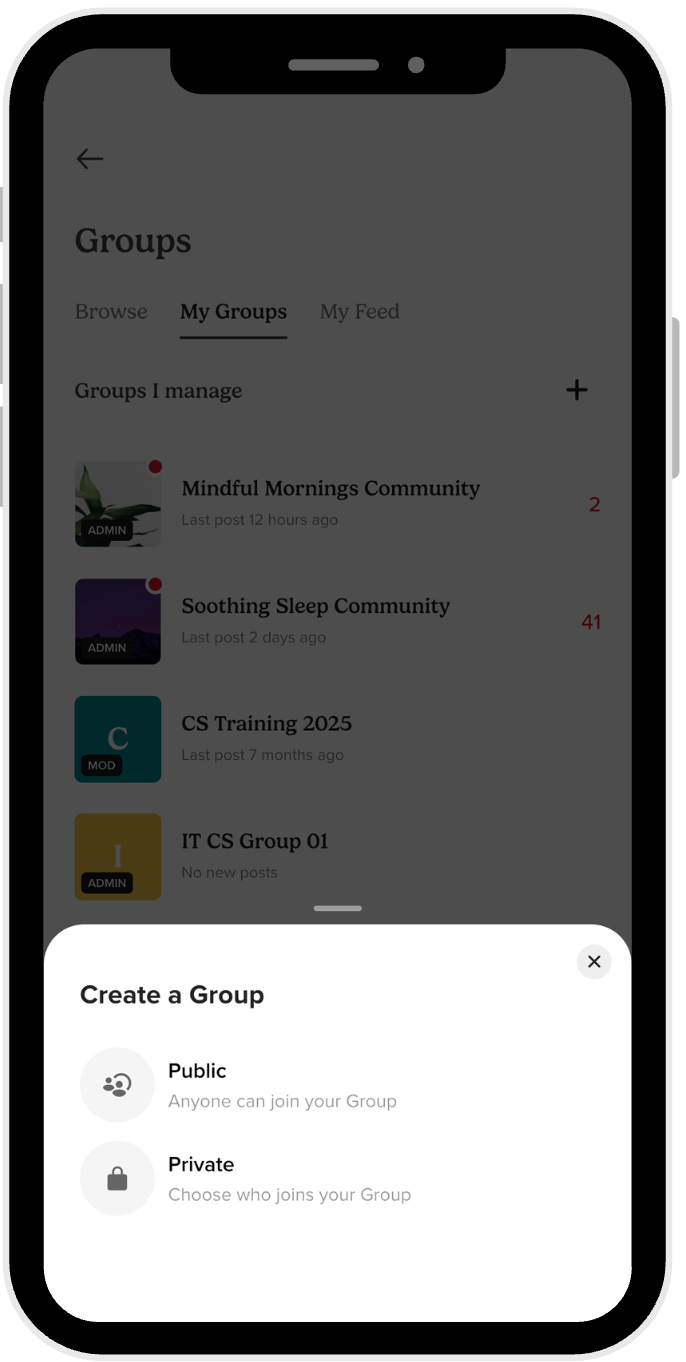
- Click on the + icon in the top right corner to create a new group.
- Choose Public for your group so that community members can search for you and discover your group organically through the app.
- Once you've created your group, click on Group details to refine and customize all the settings. You'll be able to edit the title and description, set the group location, add a color to make it visually distinctive and memorable, and tag your group with up to 3 relevant tags to help new members find you.
Where Your Group Appears on Insight Timer
Your group or groups will be displayed prominently on your teacher profile. This makes it easy for your followers and community members to find and join your space. It becomes a central hub where people who've benefited from your teachings can gather, reconnect, and deepen their practice together as a community.
Public vs. Private Groups: Choose What Works Best for Your Community
You have complete control over your group's membership. You can create either type based on what serves your specific community and teaching goals:
- Public groups — anyone can join without requiring your approval. These work best for teachers who want to reach a broad audience, build community organically, and remain accessible to new practitioners.
- Private groups — only you as the administrator can approve which members join. This option works well for closed communities, advanced students, paid courses, or groups with specific requirements or prerequisites.
Delegate Management With Moderators and Administrators
You don't have to manage everything alone. Groups are managed through a structured system of administrators and moderators, and it's important to understand how each role functions and contributes to community health:
- The Administrator — that's you, the group creator. You hold the primary responsibility of managing the group and setting its overall direction, tone, values, and community culture. You have the power to make all major decisions about the group's future.
- Moderators — these are community members appointed by you to help monitor and oversee the group. They assist with day-to-day community management, helping enforce guidelines and maintain a healthy environment. This frees you up to focus on what you do best: teaching and creating content.
Custom Group Guidelines
Every group can have its own set of guidelines that are separate from (and in addition to) Insight Timer's Community Guidelines. When members join your group, they agree to follow these rules and norms that you establish for your specific community.
- Group administrators can write these guidelines as a dedicated post or include them in the About section of the group where they're always visible to all members.
- These custom guidelines help you shape the culture and set clear expectations within your specific community space. They reflect your teaching values and what you want the group to embody and represent.
On Identity and Authenticity in Your Group
We keep groups safe and authentic by maintaining clear standards for how community members represent themselves within the platform:
- All group members — administrators, moderators, and regular members — must provide genuine profile information and cannot impersonate someone else. Authenticity builds trust and enables real connection.
- Profile photos and avatars shouldn't contain nudity, depictions of violence, phobia-triggering images, or symbols that might offend members of the broader community. This keeps the space welcoming and safe for everyone.
Posting and Promotion Standards for Group Members
To maintain a healthy, focused, and respectful community space, all members must follow these standards when posting and sharing content:
- Post only relevant content to the group. Don't share external links, email addresses, websites, or other platforms in groups unless directly relevant to the community.
- Don't promote commercial enterprises or businesses outside of Insight Timer.
- Don't ask members for personal information like email addresses or contact details.
- Don't spam groups — unsolicited private promotional messages are explicitly considered spam.
- Don't post copyrighted material that belongs to others.
- Don't share private messages from other users without their explicit permission.
- Don't cross-post the same message to multiple groups where you're not the administrator, as this dilutes community value.
Teachers who do not follow these standards will face escalating consequences. After being flagged three times for violations, teachers are permanently banned from Insight Timer. We take community safety seriously because the integrity of our communities is foundational to who we are as a platform.
Keeping Your Group Safe and Healthy
Community safety is everyone's responsibility, and we give you tools and support to maintain a healthy group. If you see a member violating our Community Guidelines, report them in these ways:
- Report users by tapping on their profile photo or avatar to bring up their profile page, then tap on the flag icon to file a report.
- Report comments or posts by tapping the flag icon directly next to the comment or post you're concerned about.
- Contact us directly through the app or at help@insighttimer.com if you need additional support with a complex issue.
As a group administrator or moderator of a private group, you also have the authority to proactively remove posts or users from your group if you believe a breach of guidelines has occurred. You're empowered to manage your community as you see fit within these guardrails and standards.
Crisis Support and Emergency Resources
If a group member is experiencing a mental health crisis or if anyone may be in danger, we have emergency resources available to provide immediate help and support. Community member safety is paramount and non-negotiable. We encourage you to direct people to appropriate resources and reach out to support if you're concerned about anyone's wellbeing.
Consequences for Violating Group Guidelines
Members who breach or violate our Community Guidelines may face escalating consequences that include:
- Temporary bans from posting to give them time to reflect on their actions.
- Removal from the group if behavior continues or patterns emerge.
- In extreme cases involving serious violations, permanent bans from Insight Timer entirely.
Learn More About Group Leadership and Best Practices
Want to dive deeper into group leadership, community management, and best practices for teachers? Check out our comprehensive guide with tips and strategies here.
Thank you for keeping our community safe, welcoming, and authentic by following and upholding these guidelines and standards. Your group is a direct extension of your teaching work and personal mission, and we're genuinely honored to help you build and nurture it over time.