
A replay is the recording of a live event you hosted, published to your Insight Timer profile so members can watch it on demand. It gives your live teaching a second life: the people who couldn't make the time zone work, or who found you afterwards, can still experience the session.
Replays are always your choice. Nothing publishes automatically.
At a glance
- Replays are opt-in. You decide after the session ends, and nothing publishes without you.
- Live events you host from the launch of this feature onwards can become replays. Sessions hosted before then aren't eligible for now.
- Replays publish as they're recorded. You can edit the title and description, but you can't trim the video.
- The live chat carries over and plays out as it did during the session.
- You choose whether a replay is free to all members, or premium for Member Plus subscribers.
- Replays appear on your teacher profile, on the What's On tab, and in members' Activity tab.
- Plays count towards your engagement earnings the same way on-demand video plays do.
- A replay stays available for as long as you keep it published. There's no expiry date.
- Paid live events are the exception: they always become replays, and ticket holders keep access.
In this article
The basics | Opting in | What's in the replay | Where replays appear | Earning from replays | Paid live events and replays
The basics
Which of my live events can become replays?
Live events you host from the point the replays feature launches onwards. Sessions you hosted before launch won't be available as replays for now, though this is something we may revisit.
After you submit a concluded live event to be published as a replay, publishing is not guaranteed. Our team will first review your replay, and if it meets our guidelines, it will be published. If it doesn't meet our requirements, our team will let you know it has been rejected and share feedback on why, so you can make adjustments in future.
Do I have to publish a replay?
No. Opting in is your choice and nothing publishes automatically.
The one exception is paid live events. Every paid event is published as a replay, because replay access is part of what the member pays for.
How long does a replay stay available?
For as long as you keep it published. There's no expiry date. You can unpublish a free or premium replay at any time, and it will no longer be available to members.
Paid replays are the exception. People have paid for access, so they stay available.
Opting in
How do I opt in to making a free live event a replay?
You opt in after your event has finished.
- Host your live event as normal and end the session.
- You'll be prompted to create a replay. The recording also waits for you in the Replays section of your Teacher Dashboard.
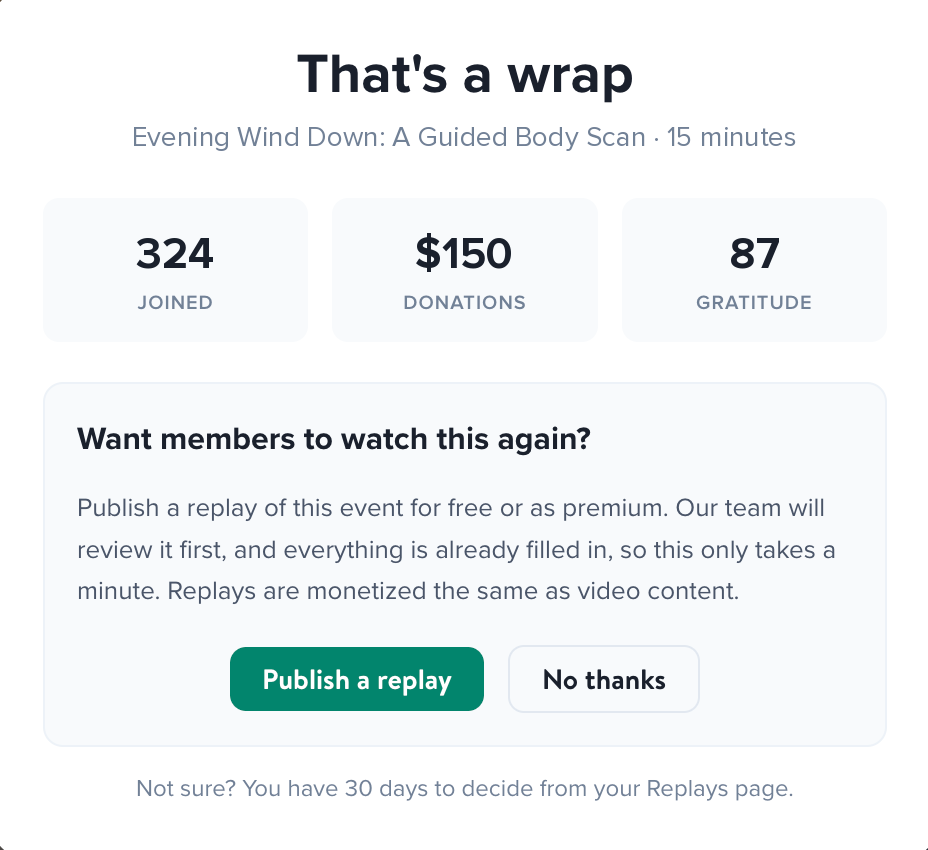
- Review the replay details. You can edit the title and description.
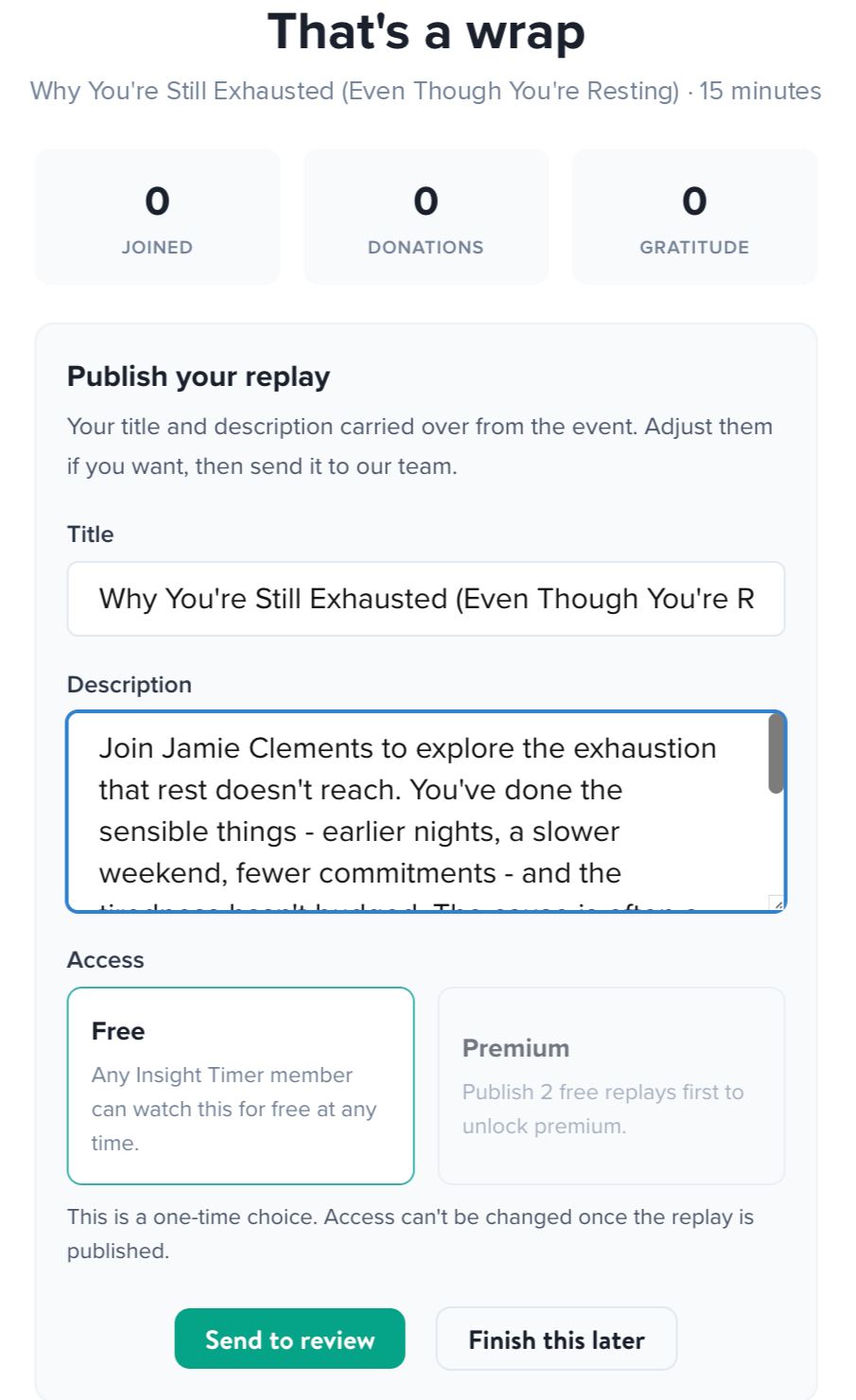
- Choose whether the replay is free to all members, or premium and available only to Member Plus subscribers.
- Submit it for review.
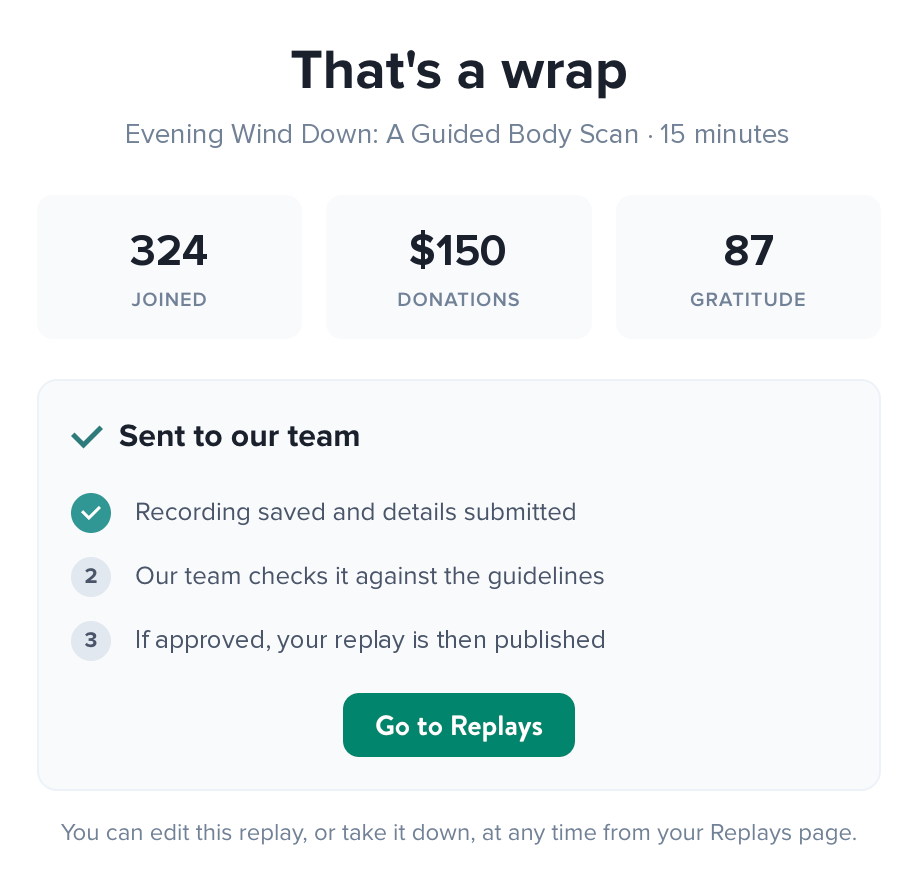
- If approved, your replay will then be published.
Is my submitted replay guaranteed to be published?
No. Once you submit a finished event, our team reviews it against our guidelines. If it meets them, we publish it. If it doesn't, we'll tell you why so you can adjust for next time.
How long do I have to decide?
30 days from the moment your live event ends. During that window the recording sits in the Replays section of your Teacher Dashboard and you can opt in whenever you're ready.
Once 30 days have passed, the option closes and that session can no longer become a replay. If there's any chance you'll want it, opt in before the window ends. You can unpublish a free or premium replay later if you change your mind.
Can I decide in advance, when I schedule the event?
Not for now. Opting in happens after the live session ends, so you can watch the recording back before deciding whether to share it. We may look at pre-session opt-in later on.
What's in the replay
Can I trim or edit the recording?
Not at this stage. Replays publish as recorded, so what happened in the session is what members will see.
Tip: teach to the replay as well as to the room. How you open and close a session shapes the replay too. See Live Events Replays: Best Practices.
Does the live chat appear in the replay?
Yes. The chat carries over and plays out just as it did during the live session, so the replay keeps the feel of a room full of people rather than a recording in isolation. Any promotional cards you showed or questions you pinned during the live event won't appear in the chat.
What can I change before the replay is published?
For now, you can update the title and description.
Where replays appear
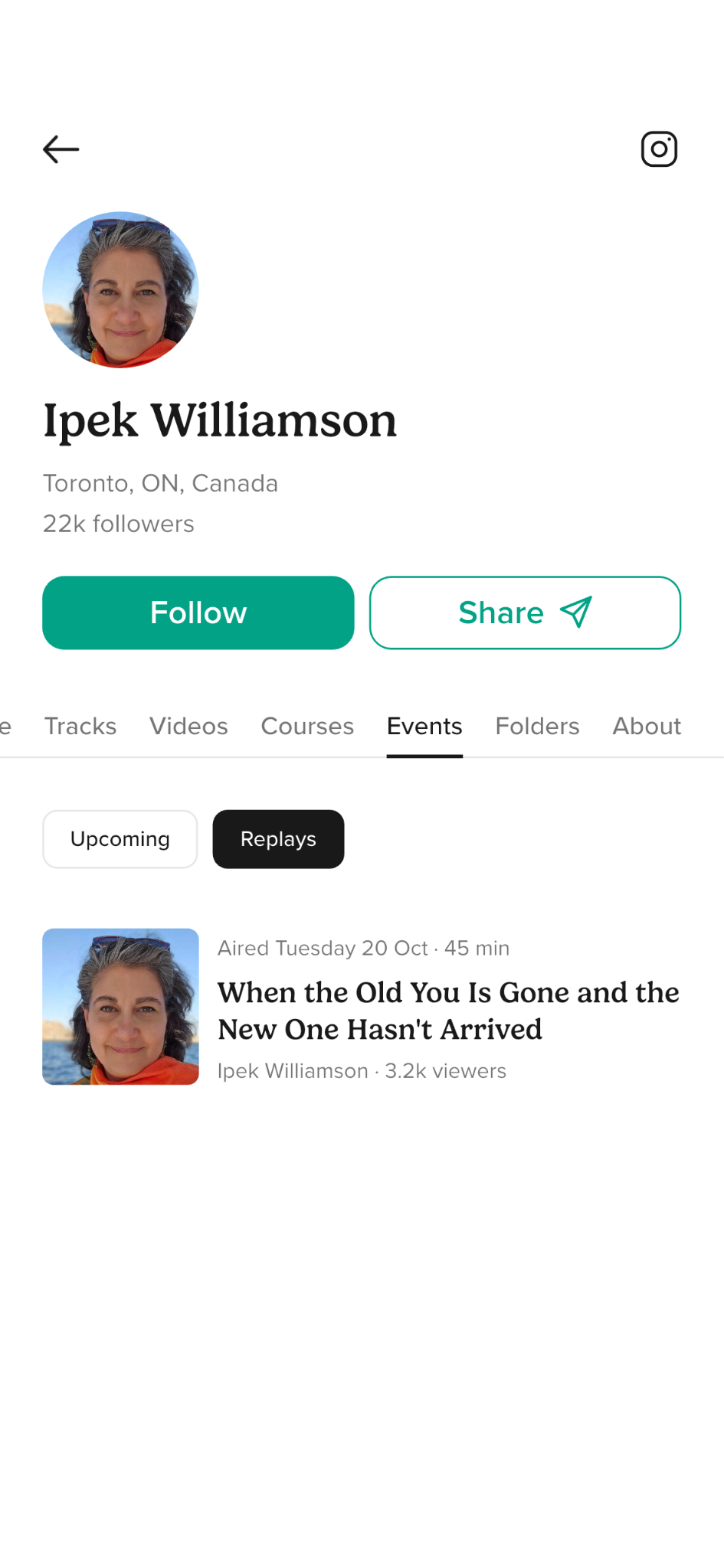
Where do replays show up for members?
On your teacher profile, on the What's On tab, and in members' Activity tab.
Earning from replays
Can I monetise a replay?
Yes. Replays are monetised the same way your video content is today, including the option to publish as premium. If you already publish premium videos, this will feel familiar.
Can my first replay be premium?
No. You need at least two free replays published before you're eligible to publish a premium one.
This means members can experience your live teaching before they're asked to pay for it, which makes a premium replay an easier decision for them.
Do replays count towards my earnings?
Yes. Plays on a replay count towards your existing engagement earnings in the same way on-demand plays do.
Where do I see how a replay is performing?
Replay analytics will sit alongside your other video analytics in the Teacher Dashboard once the replay is published.
Paid live events and replays
Do ticket buyers get the replay of a paid live event?
Yes. Everyone who buys a ticket gets replay access afterwards, including anyone who couldn't attend live.
Does a paid event have to become a replay?
Yes. Every paid live event is published as a replay. It's part of what the member is paying for, so there's no opting in or out.
Can members buy the replay if they missed the live event?
Yes. Members who didn't buy a ticket to the live session can buy access to the replay afterwards. You earn on those sales the same way you earn on tickets, and Member Plus subscribers receive the same 30% discount.
Can I unpublish a paid replay?
No. People have paid for access to it, so it stays available. Insight Timer may still remove content that doesn't meet our guidelines.
For pricing, earnings and refunds, see the Paid Live Events FAQ.